SharePoint Server continuously prompting for Credentials

Sometimes it is the case when your SharePoint server keeps on prompting for credentials. After some amount of googling and going through some reliable blogs I found following solution.

  • Open Run Type “regedit”. 

  •                                                                
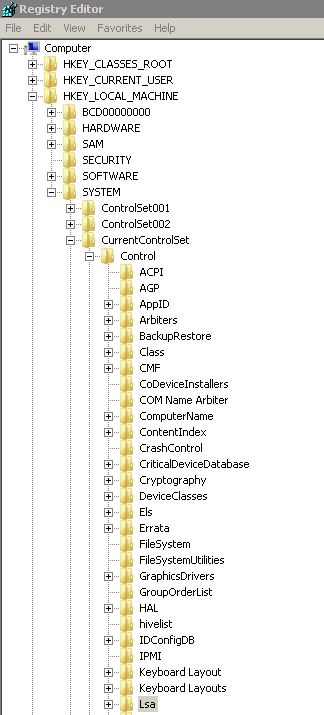
  • In the registry window left panel find HKEY_LOCAL_MACHINE > SYSTEM > CurrentControlSet > Control > LSA
  •                                                                                                                     
  • Now right click LSA and select New > DWORD.


  • Now Rename DWORD to "DisableLoopbackCheck".


  • Set its value to 1 and Select Hexa Decimal.


6.      Click OK.

That’s it this will disable loopback credentials prompting.

Regards,
Keyur Pandya

Comments

  1. Very use full blog @Keyur.
    Thanks for sharing..

    ReplyDelete
  2. Thanks Keyur, I was looking for the same and this helped.

    ReplyDelete

Post a Comment

Popular posts from this blog

Business Data Connectivity

I came to a requirement wherein I was supposed to get data from an 3 rd party portal using API’s and then bring them to SharePoint server. The first approach that I finalized was just to make BDC solution that will get data from 3 rd party portal and will deploy it to SharePoint. How to Create BDC solution in SharePoint? I found below link that is having really great description about hot to create and deploy the BDC solution to SharePoint. http://www.c-sharpcorner.com/uploadfile/hung123/creating-business-data-connectivity-service-using-visual-studio-2010/ After creating an POC I came to know that BDC model cannot be deployed on Multi tenant farm. So what can be done next? After some amount of googling I came to know that we can create BDC solution using WCF services also. So I created a WCF service solution that acted as a wrapper that used to fetch data from the portal. We can them publish that service to IIS or Server and use the servic...

Dataverse Multi Choice Columns in PowerApps

We have been working with PowerApps, PowerApps and Dataverse and now I thought of sharing a few tips to ease your work if you are new to PowerApps + Dataverse as a combination. I will be sharing a few more tips in my upcoming blogs but to get started, Let’s take Multi Choice Columns this time. Unlike SharePoint or any other data source, Dataverse Multi choice columns are different so basically, I cannot go to my PowerApp and directly print selected value in a label. So, this is how you can show multi choice values in label. You need to use concat that allows to concat multiple selection. PowerApps has concat function that takes. Concat function syntax :  Concat (  Table ,  Formula  ) In my case I am trying to render a multi choice column values into a vertical gallery webpart. I have added a label control to a vertical gallery and then added below code.   Concat(ThisItem.ColumnName,Value & "") Hope this helps, Thanks, Keyur

SharePoint hosted apps with Angularjs

Wow.. I thought i won't be able to manage to write a blog this month. Hey guys today i am here with a something of that i have been planning since a long time. Some time back i tried to implement Angularjs with SharePoint. To be frank Angularjs is just awesome. You can have flawless feel while working with it. I don't know how will i manage to work with Angularjs in huge projects but i found it really really good to work with single page applications. Let's have a look to the classic definition of Angularjs that you find when you google for Angularjs. Angularjs "AngularJS is a structural framework for dynamic web apps. It lets you use HTML as your template language and lets you extend HTML's syntax to express your application's components clearly and succinctly. Angular's data binding and dependency injection eliminate much of the code you would otherwise have to write." SharePoint Apps SharePoint Apps, I personally found it more developer...